REVIEW · NIAGARA FALLS AND AROUND
Amazing Scavenger Hunt: Hunt Along Niagara Falls
Book on Viator →Operated by Let's Roam · Bookable on Viator
Niagara Falls turns into a game. That’s the fun twist here: you follow clues through major landmarks and earn photo points as you go. I especially like the role-based teamwork (Braniac, Photographer, Mapper) and the chance to work your way from street sights up to big viewing moments like Skylon Tower. One real drawback to plan around is that the hunt runs on your phone and can stall if you don’t have steady connectivity.
This is a self-guided hunt, not a guided walk with a person leading you. You use the Let’s Roam app for maps, riddles, and photo challenges, and each player gets their own role so a group doesn’t just watch one person solve everything. It works best when you’re comfortable walking a moderate amount and you’ve got a charged smartphone.
At about $12.44 per person for roughly two hours, it’s usually good value if you want a structured way to see Niagara Falls without paying for a full tour. If you’re hoping for guaranteed phone service at every step, it’s smart to think twice first—there’s at least one clear connectivity complaint tied to the app working only with consistent Wi‑Fi.
In This Review
- Key things that make this hunt work
- Niagara Falls on your terms, with a game plan instead of a tour bus
- Before you go: phone charge, power backup, and the Wi‑Fi reality
- Starting point at 6650 Niagara River Pkwy and how to pace the 2-hour loop
- Stop 1: Nikola Tesla Monument and the first clues near science
- Stop 2: Queen Victoria Park (and nearby landmark energy)
- Stop 3: Niagara SkyWheel as a checkpoint for viewpoints and timing
- Stop 4: Skylon Tower for panoramic moments (and the payoff)
- Stop 5 and 6: Niagara Falls and Horseshoe Falls for mist, sound, and big photos
- How the roles and photo challenges keep groups from stalling
- Price and value: what $12.44 covers and what you’ll likely pay separately
- Who this is best for (and who should skip it)
- Should you book the Niagara Falls scavenger hunt?
- FAQ
- Is this activity guided by a tour guide?
- How long does the Niagara Falls hunt take?
- What does the app include?
- Where do we start, and where does it end?
- Can we start at any time during the day?
- What is included in the price?
- What should we bring or prepare before we start?
Key things that make this hunt work

- Team roles that keep everyone busy: Braniac, Photographer, or Mapper means different tasks for each player.
- Photo challenges with digital copies: you’re not just walking past sights; you’re capturing them for the app.
- An easy route built around famous stops: Tesla monument, Queen Victoria Park, Niagara SkyWheel, Skylon Tower, and both falls areas.
- Self-paced timing: you can start whenever you want during the day and go at your group’s speed.
- Wi‑Fi can make or break it: the app depends on connectivity, so bring a power bank and have a plan if signal is spotty.
Niagara Falls on your terms, with a game plan instead of a tour bus
Niagara Falls can feel like a lot of noise and crowds unless you give yourself a reason to slow down. This scavenger hunt gives you that reason. You’re not just sightseeing. You’re hunting clues, solving short challenges, and moving between landmarks that many people only snap from one angle.
The best part is that the route is designed around the classic Niagara highlights, but the app turns each location into a mini mission. That means you spend more time noticing details—signage, surroundings, and viewpoints—rather than rushing from one “must-see” to the next. If you’re traveling with friends or family, the role system also prevents that common issue where one person becomes the navigator and everyone else hangs back.
The downside is also built into the concept: you’re relying on a phone. If your device can’t load maps or photos properly, your pacing and fun take a hit.
You can also read our reviews of more tours and experiences in Niagara Falls and Around.


Before you go: phone charge, power backup, and the Wi‑Fi reality
You’ll start by downloading and running the Let’s Roam app on the day of your hunt, and you should treat your smartphone like your ticket, compass, and camera all at once. The information provided with the activity strongly suggests your phone should be fully charged, and a power bank is a smart idea if you tend to use location services, camera, and screen brightness heavily.
Now for the practical caution: one detailed complaint in the feedback points to an issue when multiple people tried to use the hunt while signal was weak. The support response described a need for continuous Wi‑Fi, and the hunt didn’t finish when connectivity was intermittent. You can’t control where Wi‑Fi strength will be best from the sidewalk.
What you can do:
- Download anything the app lets you access ahead of time.
- Keep your phone on a low-power setting if it won’t ruin navigation.
- If you’re in a group, try to make sure at least one device stays connected and fully logged in.
If you’re the type who hates tech uncertainty, this may feel stressful. If you’re okay with a little troubleshooting and you’re prepared, the app-based format becomes part of the fun.
Starting point at 6650 Niagara River Pkwy and how to pace the 2-hour loop
The hunt begins at 6650 Niagara River Pkwy, Niagara Falls, ON L2G 7B7, and it ends back at the same meeting point. The activity hours run 7:00 AM to 10:00 PM, every day, so you’re not boxed into a narrow departure time.
You can start at your own pace, and it’s described as a private activity where only your group participates. That’s helpful because it lets you pause for photos, switch roles, and take breaks without feeling like you’re holding up strangers.
Because the hunt is designed around walking between multiple well-known stops, you should dress for getting around in weather. The guidance recommends comfortable shoes and weather-appropriate clothing, and it also notes a moderate physical fitness level. There’s no minimum age requirement, but younger kids may find it easier if they have a role that fits their attention span.
Aim for the full two hours if you want to do the photo prompts calmly. If you rush, you’ll still cover the route, but you’ll likely miss some of the fun scoring moments.
Stop 1: Nikola Tesla Monument and the first clues near science
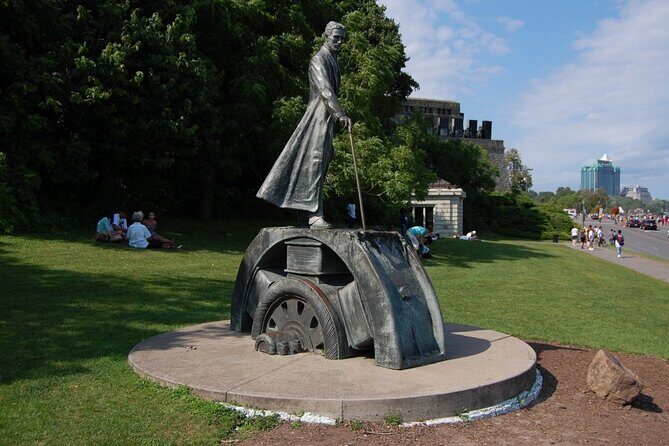
The hunt kicks off at the Nikola Tesla Monument, your first big checkpoint. This is a nice warm-up because it anchors the experience in a character that people connect with Niagara through the region’s energy and innovation stories.
In practical terms, this first stop helps you get comfortable with how the app works. You’ll likely confirm your role, start the initial riddle flow, and get the rhythm of switching between prompts and location-based tasks. If your phone is slow or your map view takes a minute to lock in, the opening stop gives you space to troubleshoot without losing the whole hunt.
What to watch for here is the mood. This isn’t just a photo op. Your mission is to use the area around the monument as a starting point to orient yourself before the route becomes more “falls-focused” and busy.
Stop 2: Queen Victoria Park (and nearby landmark energy)
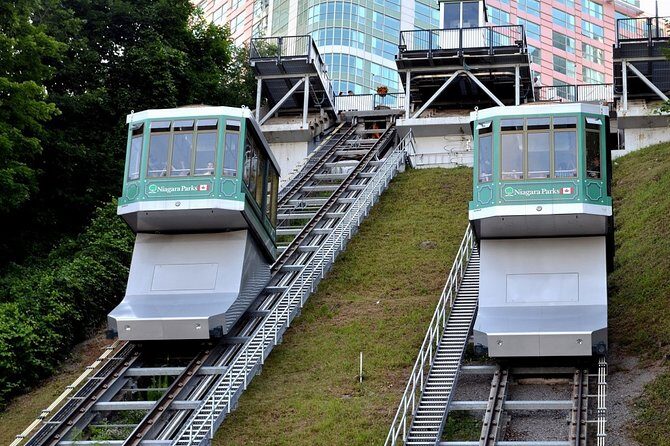
Next up is Queen Victoria Park. This area matters because it’s one of the most common gateways between classic Niagara sightseeing and the greener, calmer pauses you want during a walking hunt.
The hunt description connects this stop to Queen Victoria Place and the broader park setting, which means you’re not only walking past buildings—you’re moving through an area meant for viewing, strolling, and resetting. For your team, it’s a good spot to let the roles evolve. For example, the Mapper can work on directions and context, while the Photographer can hunt for angles that fit the app’s photo prompt style.
A small practical note: parks are where people naturally slow down, so if your group has mixed walking speeds, this is a good place to bunch up and keep everyone on the same page. It also makes a nice break if the falls area later gets overwhelming.



Stop 3: Niagara SkyWheel as a checkpoint for viewpoints and timing
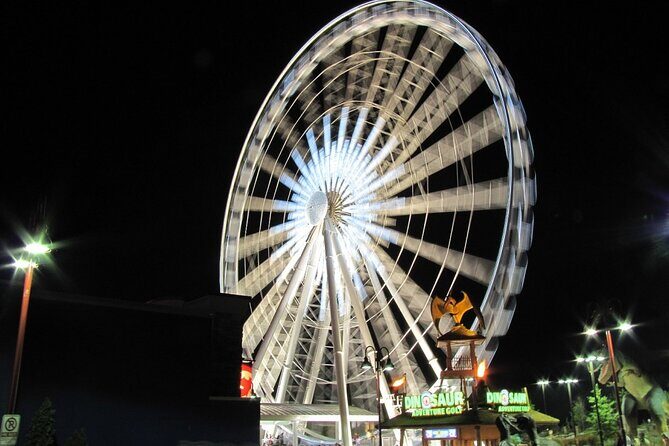
The route then includes Niagara SkyWheel. Even if you’re not planning to ride anything, it’s a clear landmark with a distinct structure that helps you confirm you’re on track.
In scavenger-hunt mode, that matters. When you’re solving photo challenges, you’re constantly aligning your camera, angle, and position. A recognizable sight like the SkyWheel reduces guesswork. You’ll feel more confident moving forward toward the taller viewpoint areas later.
Also, because this part of the route sits between park scenery and the bigger skyline/falls zones, it’s a good “pace adjustment” stop. If you’re ahead of schedule, you can slow down here. If you’re behind, it helps you re-center without skipping the main sights.
Stop 4: Skylon Tower for panoramic moments (and the payoff)
Then you reach Skylon Tower, one of the route’s big payoff stops. The hunt description specifically points to panoramic views here, and that’s exactly why this checkpoint is valuable.
This is where your game starts to feel like more than a walking quiz. You’re getting a higher vantage point that helps you make sense of how the river, the skyline, and the falls region fit together. Even from street level, Niagara can look chaotic. From above, the sightlines become clearer, and the photos you take make more sense because you can see what your teammates were pointing out a few minutes earlier.
If your phone connectivity is acting up, this is another reason to keep an eye on your setup. Higher-traffic zones can mean signal fluctuations. Still, if you manage your battery and keep your app session active, this is one of the most satisfying stops in the whole route.
Stop 5 and 6: Niagara Falls and Horseshoe Falls for mist, sound, and big photos

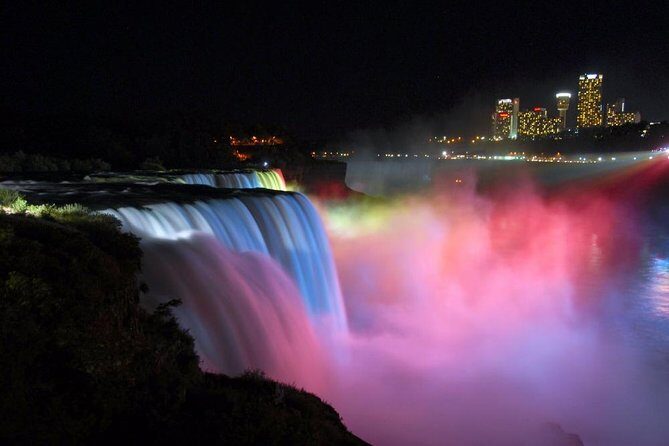
The last stretch brings you to Niagara Falls and then Horseshoe Falls. This is the emotional finale: the roar, the mist, and the scale of the water. The hunt description also mentions misty, close-up viewpoints like the Table Rock House area, which matches what you’ll feel as you get nearer to the action.
These stops are where the scavenger hunt format shines hardest. When you’re at the falls, you naturally want multiple angles. The app’s photo challenges give that desire a structure, so you’re not just shooting random shots—you’re capturing for specific prompts.
Practical tips for the finale:
- Wear shoes that handle wet pavement and crowds.
- If it’s breezy, hold your phone more firmly when taking photos.
- Don’t try to force everyone to stay at the same exact spot; instead, assign one person to focus on the next clue while others handle the photo prompt.
If your group is divided by pace, the falls area can get tight and crowded. Build in quick regroup moments so you don’t lose the thread of the hunt.
How the roles and photo challenges keep groups from stalling
One of the most useful parts of this experience is how it distributes the work. Each player has an individual role, and you can choose a style like Braniac, Photographer, or Mapper. That does two things for you: it keeps people engaged even when they’d rather wander, and it creates different kinds of participation.
Here’s how this typically plays out in real life:
- The Photographer usually drives the photo challenge moments. Expect this role to want good angles and quick repositioning.
- The Mapper focuses on navigation and planning, which is especially helpful if Wi‑Fi is unreliable.
- The Braniac tends to handle riddles and clue interpretation, turning the hunt into a team puzzle rather than a walk-and-hope task.
You’ll also have digital copies of your adventure hunt photos, which is a nice bonus because you don’t have to rely on remembering which shots turned out best during the chaos. The app also includes maps, riddles, and leaderboards, which adds a light competitive edge—fun, not serious.
Price and value: what $12.44 covers and what you’ll likely pay separately
At $12.44 per person for about two hours, the value is driven by the included tech and structure. You’re paying for:
- the self-guided hunt itself,
- role-based tasks and photo challenges,
- app access via Let’s Roam,
- photo delivery as digital copies,
- and support through phone/email/chat.
You’re not paying for a live tour guide, private transportation, or attraction tickets. The activity also specifies that attraction fees are not included. In plain terms: this is a “see the sights and complete missions” format, not a bundled admission package.
So when does it feel like a smart buy?
- If your group enjoys puzzles and photos.
- If you want a structured way to hit the main Niagara highlights within a short window.
- If you’re okay doing most of the walking yourself and relying on your phone.
When might it disappoint?
- If you’re visiting during a time when connectivity is poor.
- If you hate self-guided experiences and want someone to handle logistics.
Who this is best for (and who should skip it)
This hunt is a strong match for families, friends, and mixed groups who want a playful way to explore without hiring a guide. It’s also a good fit if you like switching roles so no one person ends up carrying the entire experience.
It may be less ideal if:
- your group expects a guaranteed phone-signal path at all times,
- you prefer fully offline experiences,
- or you’re traveling with people who get frustrated by tech hiccups.
The good news is that the route is built around major, recognizable Niagara landmarks. Even if you take a slower pace, you’re still seeing a lot of iconic scenery.
Should you book the Niagara Falls scavenger hunt?
I’d book it if you want a two-hour activity that makes you move through Niagara Falls with purpose: roles, riddles, and photo prompts tied to famous stops. The price is also fair for what you’re getting, especially if you’ll actually use the app’s photo challenges and want a set of digital photos afterward.
I’d hesitate if your group has low tolerance for interruptions caused by connectivity. The clearest downside from the feedback is that intermittent Wi‑Fi can prevent parts of the hunt from working as expected.
If you go, go prepared: charge your phone fully, bring a power bank, and treat the last phase near the falls as your high-impact photo moment. With that mindset, this becomes a fun way to see Niagara Falls beyond the usual quick stop-and-go.
FAQ
Is this activity guided by a tour guide?
No. It’s a self-guided scavenger hunt. You use the Let’s Roam app for maps, riddles, and photo challenges.
How long does the Niagara Falls hunt take?
It runs for about 2 hours (approx.).
What does the app include?
The app provides maps, photo challenges, riddles, and leaderboards. You also get digital copies of your adventure hunt photos.
Where do we start, and where does it end?
You start at 6650 Niagara River Pkwy, Niagara Falls, ON L2G 7B7, Canada, and the activity ends back at the same meeting point.
Can we start at any time during the day?
Yes. It’s described as self-guided with the ability to start at any time and at your own pace, within the listed operating hours (7:00 AM to 10:00 PM).
What is included in the price?
Included are the self-guided hunt, individual player roles, photo challenges, app access, digital copies of your photos, and support (phone/email/chat), plus all taxes and fees.
What should we bring or prepare before we start?
Bring a fully charged smartphone, and consider a power bank. The hunt uses your phone for navigation and interaction with the app, and weather-appropriate clothing and comfortable shoes are recommended.